Informed Consent Audit Trails: Why, How, and Downloadable Checklist
#What are the key takeaways?
- Legal Sufficiency: A digital signature is legally meaningless in court or audits without a verifiable, secure audit trail that proves exactly what the user read, when they signed, and that the file remains unaltered.
- FDA 21 CFR Part 11: Requires automated, time-stamped logs of all actions (creation, editing, signing, or deletions) linked to a specific user. These logs must be append-only and cannot be deactivated by administrators.
- The "Build vs. Buy" Trap: For organizations considering building a custom intake app, designing your own compliant audit ledger requires complex cryptographic signing chains, key rotation systems, and audit log separation. This process consumes extensive engineering resources.
- Developer Frameworks vs. Ready-to-Use Solutions: Infrastructure logging tools like Volidator (volidator.com) are designed for developers coding custom apps from scratch. However, for CROs, hospitals, clinics, and research sites, using a ready-to-use eConsent platform like ConsentCollect provides complete, court-ready compliance instantly with zero development cost.
- Integrated eConsent: For healthcare providers and research organizations, using an out-of-the-box eConsent platform like ConsentCollect provides complete compliance instantly, avoiding the engineering costs of building audit trails.
#Why is a consent audit trail crucial?
In clinical research and healthcare, the digital signature is only the final step of a much larger process. An electronic signature on a document is easy to generate, but it is incredibly difficult to defend during a regulatory inspection or in a court of law. If a patient or research participant claims they did not understand the risks, or asserts that the document was altered after they signed, the burden of proof falls entirely on the healthcare provider or research sponsor.
Standard PDF files with electronic signatures can be manipulated. Without supporting evidence, there is no way to prove that the document was not changed after the fact. This is where the consent audit trail becomes necessary.
An audit trail is a secure, computer-generated, time-stamped record that details every step in the lifecycle of an electronic record. It documents who accessed the form, what information they viewed, when they signed, and what version of the document was presented to them. In this guide, we will analyze the technical, regulatory, and architectural requirements for building and maintaining compliant consent audit trails. We will also compare the challenges of building a custom ledger from scratch with modern infrastructure alternatives.
#What do the FDA and HIPAA require?
Healthcare systems and clinical trials must comply with two distinct regulatory frameworks. While both frameworks focus on data security, they have different priorities and enforcement mechanisms.
What are the FDA Part 11 rules?
The United States Food and Drug Administration (FDA) established 21 CFR Part 11 to govern electronic records and electronic signatures. The goal is to ensure that digital records are just as trustworthy and reliable as traditional paper records.
Under 21 CFR Section 11.10(e), the FDA outlines strict rules for audit trails. The regulations state that systems must use secure, computer-generated, time-stamped audit trails to independently record the date and time of operator entries and actions. These actions include creating, modifying, or deleting electronic records.
Key requirements under Part 11 include:
- Automation: The system must generate the audit trail automatically. The user cannot manually write or select when to start logging.
- Immutability: The audit trail must be append-only. Users, including database administrators and developers, must not have the ability to modify or delete the logged events.
- Chronological Order: The events must be recorded in the order they occurred, using a synchronized system clock.
- Retention: The audit trail must be kept for the same period required for the underlying electronic record. For clinical trials, this often means retaining logs for decades.
- Inspection Readiness: The logs must be formatted in a way that allows inspectors to search and review them during an audit.
What are the HIPAA security rules?
While the FDA focuses on clinical trials and drug approvals, the Department of Health and Human Services (HHS) enforces the Health Insurance Portability and Accountability Act (HIPAA) for daily patient care. The HIPAA Security Rule, specifically 45 CFR Section 164.312(b), focuses on audit controls.
HIPAA requires covered entities to implement mechanisms to record and examine activity in systems containing electronic Protected Health Information (ePHI). Unlike the highly detailed rules of FDA Part 11, HIPAA is performance-based. This means organizations must implement "reasonable and appropriate" safeguards based on their size and technology.
However, modern security audits and HITECH requirements expect systems to track:
- System Access: Success and failure logs for user sign-ins.
- Record Viewing: Logs indicating which clinician viewed a specific patient's consent form.
- Modifications: Changes made to a patient's record, including demographic updates or changes in consent status.
- Data Transmission: Records of when and where patient consent files were exported or integrated with electronic health record (EHR) systems.
#What does a secure audit ledger require?
To build a system that satisfies both FDA and HIPAA requirements, developers must capture specific forensic data points. A simple database table with a few text columns is not sufficient. A robust consent audit log must capture the following components:
1. How is the document bound?
Every log entry must be linked to a specific state of the consent document. If a participant signs a document, the audit trail must record the cryptographic hash of the document layout and text at that exact moment. If the template is edited later, the audit trail must link the signature to the original version. This prevents the "blank check" problem, where a user signs a document that is later modified.
2. Why use synchronized time?
Audit trails must use server-side timestamps. Relying on the client device's clock (such as a patient's tablet or smartphone) is a severe vulnerability. Users can easily change the date and time on their personal devices, which would invalidate the chronological integrity of the log. The server must use network time protocol (NTP) services to synchronize clocks across all systems.
3. How should identities be separated?
The log must track both the machine-readable identifier (such as a unique user ID or database key) and the human-readable identifier (such as the name and professional role of the clinician). This ensures that developers can trace database actions while clinical auditors can easily read and understand the event history.
4. What telemetry must be logged?
To support legal admissibility, the ledger should record environmental signals:
- IP Address: The network address from which the user accessed the form.
- User Agent: The browser and operating system details, which help verify the device type used for signing.
- Access Verification: Proof that the user passed identity checks, such as entering a unique access code or verifying their phone number via a one-time passcode.
#Why is building from scratch risky?
When building a new healthcare application, it is tempting to write a custom audit trail module. Developers often assume that creating a simple audit_logs table in their relational database is an easy way to satisfy compliance requirements. However, this approach ignores the complex operational realities of audit trail security.
If you choose to build your own audit ledger from scratch, you will face several major engineering challenges:
What is the immutability paradox?
In a standard SQL or NoSQL database, any user with root database permissions can run an UPDATE or DELETE query. During a regulatory audit, you must prove that your database administrators (DBAs) or system developers could not alter the audit logs to hide errors. If a DBA can log into the server and change a timestamp, the entire audit trail loses its integrity. To solve this, you must build write-once-read-many (WORM) storage systems or implement cryptographic chain-of-custody signatures.
How do you maintain hash chains?
To prove that logs have not been tampered with, you must cryptographically link each event to the preceding event. This is done by creating a hash chain, similar to a blockchain.
Every new event hash must include the hash of the previous event:
Event Hash = HMAC-SHA256(Previous Event Hash + Current Event Data + Metadata)
If an attacker modifies a historical event, the hash chain breaks, alerting the system immediately. Implementing this pattern requires flawless cryptographic execution. A single bug in the hashing logic can corrupt the entire chain, making the history unreadable and invalidating your compliance status.
How are keys managed and rotated?
Cryptographic hash chains require a private secret key. If you store the secret key in the same environment as the database, an attacker who gains access to the database can easily recalculate the entire chain. To protect the key, you must integrate your application with dedicated Key Management Services (KMS) or hardware security modules. You must also implement key rotation policies, which require you to re-encrypt historical chains without corrupting the audit trail.
How do you handle database scale?
Audit logging requires high write availability. Every user click, page view, signature attempt, and system access event must be logged immediately. In a busy application, this translates to thousands of database writes per minute. If you store audit logs in your primary application database, the heavy write load can cause database lockups and slow down your application. You must build asynchronous queuing systems (such as Kafka or RabbitMQ) to process logs without impacting user performance.
What are the software validation costs?
Under FDA guidelines, any software used in clinical trials must undergo formal validation. This means you must document your test cases, write validation protocols (Installation Qualification, Operational Qualification, and Performance Qualification), and execute manual tests to prove the audit trail functions correctly. Developing and executing these validation packages often costs more than the software itself.
#How do Volidator and frameworks compare?
If you are a software engineer building custom systems from scratch, you will likely look for specialized logging frameworks to save time. One notable developer tool in this space that recently caught our attention is Volidator (volidator.com).
What does Volidator offer?
Volidator is an infrastructure framework built specifically for developers. It helps engineers add verifiable, zero-knowledge logging to custom applications. If an organization is building its own software platform from scratch and needs general audit logging across healthcare, finance, or retail niches, their developers can integrate Volidator via APIs.
However, Volidator is only a set of developer libraries. It does not provide a ready-to-use application.
Who should use Volidator vs. ConsentCollect?
The decision between using developer logging frameworks and eConsent platforms depends entirely on your role and operational setup:
- For Software Engineers: If you are a developer building a custom software product from scratch and need to implement custom verifiable database logging, a framework like Volidator can help you secure your backend events.
- For Clinical and Healthcare Sites: If you are a Clinical Research Organization (CRO), hospital, clinic, or research site looking for a ready-to-use electronic consent solution for participants in clinical trials or patients in routine/critical care, you do not need to build or integrate anything. You can simply use ConsentCollect out of the box, where secure, verifiable, and court-ready audit trails are automatically provided.
| Operational Parameter | Building From Scratch | Using Volidator (For Developers) | Using ConsentCollect (Ready-to-Use) |
|---|---|---|---|
| Development Cost | Extremely High (months of engineering) | Medium (integrating APIs and managing keys) | Zero (ready to use out of the box) |
| Target Audience | Custom Software Engineers | Application Developers | CROs, Hospitals, Clinics, and Research Sites |
| Regulatory Validation | Required (must write full validation packs) | Required (must validate your custom integration) | Pre-validated (system meets compliance standards) |
| Privacy Standards | Difficult (must secure local servers and databases) | Managed (zero-knowledge, data is encrypted) | Fully Compliant (built-in encryption and safety) |
| Tamper-Evident Signatures | Hard to build and maintain | Built-in via SDK hash chaining | Built-in and linked directly to consent layouts |
| Auditor Portal | Must be designed and built manually | Must be built using Volidator API | Included (clean, user-friendly audit exports) |
#How does ConsentCollect manage compliance?
ConsentCollect is engineered specifically to handle the strict compliance requirements of clinical research and healthcare. It features an advanced, built-in forensic audit ledger that runs automatically behind every template.
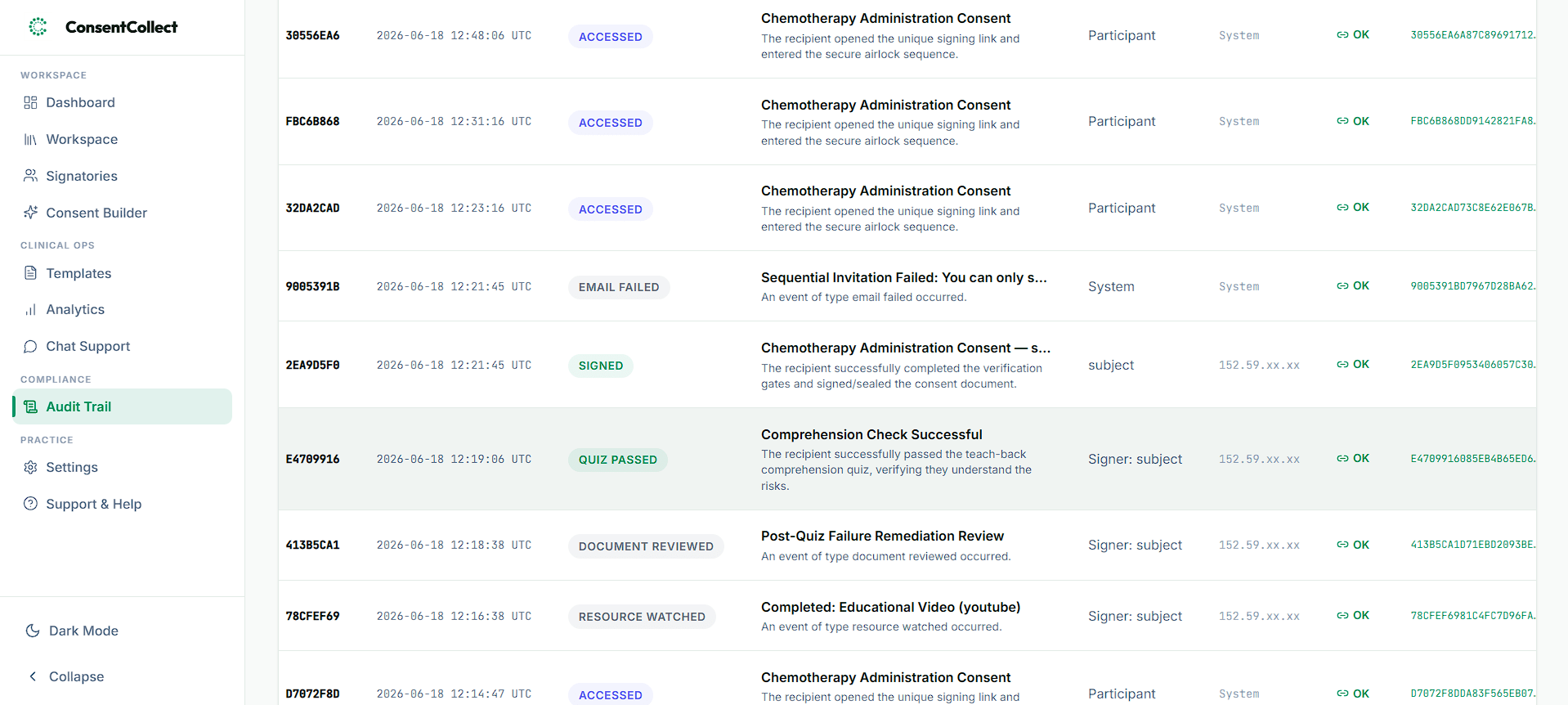
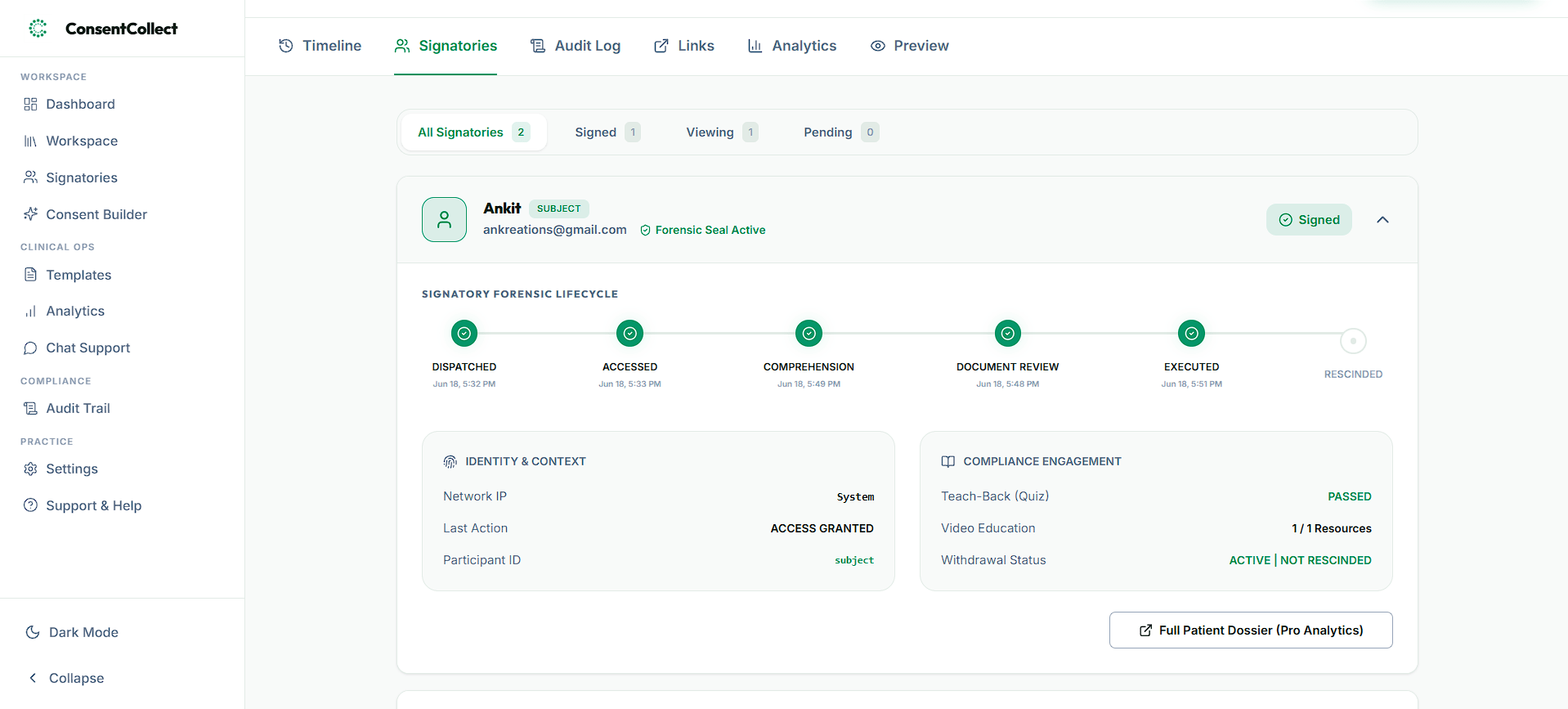
For example, the ConsentCollect clinical workspace and audit tracking interfaces illustrate the high level of detail captured automatically behind every document transaction:
How does the tamper-proof ledger work?
ConsentCollect uses a secure compliance database built directly into the platform. This ledger works in the background to ensure that your records are legally defensible:
- Automated Tracking: Every step of the consent process, from the initial invitation sent to the patient to the final digital signature, is tracked automatically. The system logs these milestones without requiring clinical staff to click any manual controls.
- Identity and Forensic Validation: The ledger records verified user information, matching the signatory's device signatures, client-specific time marks, and IP location parameters. This binds the identity of the signer directly to the action.
- Document Integrity Locks: At the exact moment a patient signs, the platform seals a cryptographic snapshot of the template text and layout. This locks the document contents, guaranteeing that no one can edit or alter the terms of the agreement after the signature is captured.
- Append-Only Security: Once an event is written to the ledger, it is locked forever. The database is strictly append-only, meaning even administrators cannot edit, alter, or delete past events, ensuring absolute transparency.
How do you export logs?
When a clinician or coordinator views a signed consent form in ConsentCollect, they can export a formal Certificate of Consent. This document acts as your audit proof. It compiles all chronological events (from the initial invitation delivery to the verification of identity and the final signature) into a single, clean report.
Each event on the certificate includes the cryptographic validation mark and server timestamp, making it ready to present to regulators or compliance auditors.
#Do you have a checklist to evaluate your system?
To help you assess your current setup, we compiled an interactive checklist of the core audit trailing parameters. You can run through these points to evaluate whether your system generates court-ready audit logs. You can also print this checklist directly or save it as a PDF for your records:
eConsent Audit Trail Compliance Checklist
Verify that your electronic consent system generates secure, court-ready audit logs.
1. Access and Identity Verification
2. Content and Version Integrity
3. Forensic and Location Telemetry
4. Storage Security and Immutability
Implementation Guidance
#Build, buy, or use a platform?
When designing an application that handles informed consent, you must decide how to manage your audit trail. Building a custom system from scratch is rarely the correct choice for most development groups. The engineering complexity of maintaining cryptographic chains, securing encryption keys, and ensuring write-availability is too high for most development groups to manage alongside their core product features.
Instead, teams should leverage specialized infrastructure:
- For Custom Log Management: If you are building custom workflows and need general-purpose, privacy-preserving event logging, developer tools like Volidator offer the correct mix of client-side security and verifiable hash chaining.
- For Informed Consent and Intake: If your goal is to register patients, perform clinical evaluations, and collect legally valid signatures, using ConsentCollect removes the development overhead entirely. You get a pre-validated, HIPAA-compliant, and FDA-compliant system with zero code to write.
By offloading your compliance logging to validated platforms, you protect your organization from data leaks, simplify your regulatory audits, and free up your engineering team to focus on improving healthcare delivery.
#Do you have compliance questions?
Related Insights & Guides
Stay compliant and optimize your workflows with guidance from clinical operations and legal experts.
Informed Consent Forms in Healthcare: The Definitive Guide
An expert guide to informed consent forms in healthcare. Learn about mandatory disclosures, optional elements, interactive patient comprehension features, and compliance rules under HIPAA, GDPR, and DPDP.
Consent Forms in Clinical Research: Definitive Guide With Free Templates
An expert operational guide to clinical trial consent forms under FDA 21 CFR Part 11, ICH GCP, GDPR, and HIPAA. Learn how to optimize participant onboarding with secure eConsent.
eConsent for Academic Medical Centers & Single IRB (sIRB) Studies: 2026 Guide
An operational guide to electronic informed consent in Academic Medical Centers under the NIH single IRB mandate, 45 CFR 46, and FDA 21 CFR Part 11. Compare REDCap limits, local relying site addenda, and audit trail workflows.